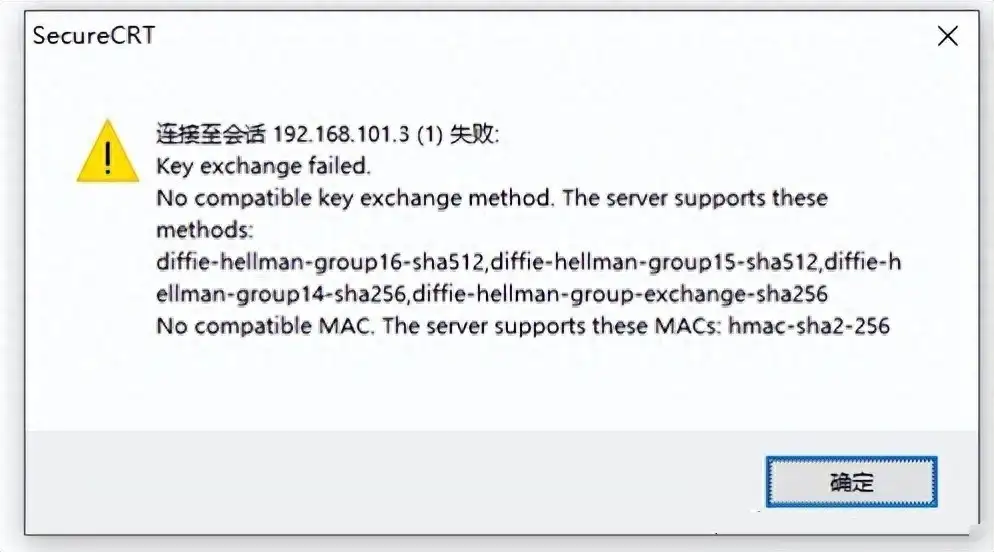
奥德彪学习网针对华为 S5735S
交换机 SSH 远程管理配置后无法登录的问题,提供标准化配置脚本与故障修复步骤,涵盖
AAA 用户配置、SSH 基础参数设置、weakea 模块加载及
SSH 加密参数重置,帮助运维人员快速定位并解决 SSH 登录异常问题,恢复
交换机的远程管理功能。
# 配置管理员密码策略
local-aaa-user password policy administrator
undo password alert original

# 创建管理员用户并配置权限
local-user admin password irreversible-cipher $1c$MDP~Z%rk4A$0Js}@u”X$:”fd’TPsu%’Wv9_P]4KzLs2%9$
local-user admin privilege level 15
local-user admin service-type Telnet terminal ssh
# 启用STelnet服务
stelnet server enable

# 生成RSA本地密钥对
rsa local-key-pair create

# 配置SSH用户参数
ssh user admin
ssh user admin server-type ssh
ssh user admin authentication-type password
ssh server-source all-interface
# 进入VTY 0-4接口视图
user-interface vty 0 4
# 配置认证模式为AAA
authentication-mode aaa
# 允许所有接入协议
protocol inbound all
当完成上述基础配置后,使用 SecureCRT 等工具登录仍提示异常时,需执行以下操作(操作前需切换至用户视图)。
# 加载weakea模块
load-module weakea
# 系统反馈信息:
# Info: Load weakea.mod from the startup system software to $_install_mod/weakea.mod. You can run the install-module weakea.mod command to install it.

# 安装weakea模块
install-module weakea.mod
# 系统成功反馈:
# Info: Installing the module flash:/$_install_mod/weakea.mod….
# Info: Succeeded in installing the module on the master board……
# 清空SSH服务器相关加密、认证配置
undo ssh server cipher
undo ssh server hmac
undo ssh server key-exchange
undo ssh server dh-exchange min-len
undo ssh server publickey

# 清空SSH客户端相关加密、认证配置
undo ssh client cipher
undo ssh client hmac
undo ssh client key-exchange
完成 weakea 模块安装与 SSH 参数重置后,重新使用 SecureCRT,输入交换机公网 / 内网 IP、SSH 端口及 admin 账户密码,即可正常建立 SSH 远程连接,实现对华为 S5735S 交换机的远程管理。